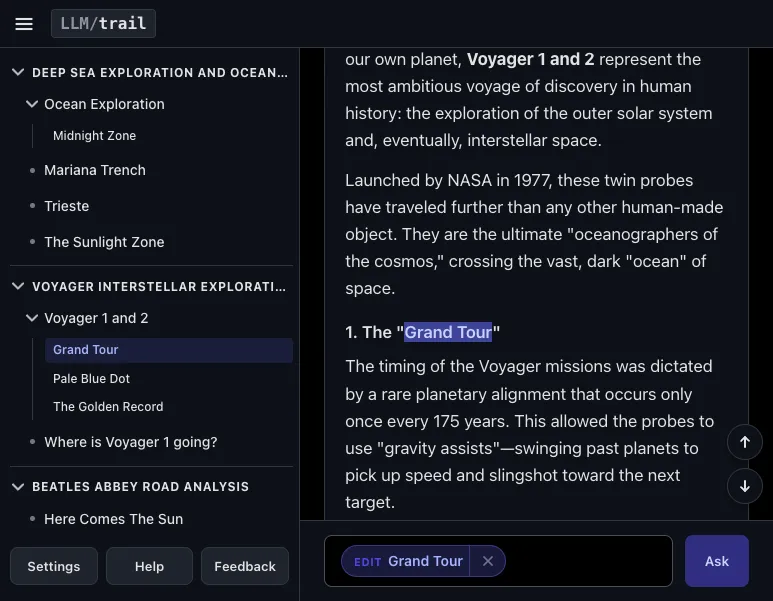
LLM chat interfaces make it easy to start with one query and quickly branch into related (and unrelated!) topics. Unfortunately, a long conversation is hard to navigate when all you can do is scroll. I built LLM/trail to cluster your chat history by topic, letting you jump directly to messages via the sidebar. Try it out at llmtrail.com or explore a live demo with sample data.
To organize your chat history, LLM/trail uses embeddings to check each message against a recency window and a topic anchor. When you send a query, the app uses Gemini to generate a summary of the query and response, which is converted into a vector embedding. The app calculates the cosine similarity of the new turn's embedding and the average embedding of the last three messages in each group (the recency window), for historical context. The turn is added to the best scoring group if it exceeds a threshold and is still similar enough to the very first message in the group (the topic anchor), to prevent long-term topic drift.
For all the details, keep reading!
LLM/trail's main affordance is an outline of your chat history, organized by topic. To build this view, I couldn't use unstable clustering methods like k-means because each new message might cause noticeable shifts in the groupings, which would be confusing for a user. To get a stable ordering, I chose an incremental approach where each message was assigned to a group once.
A note on terminology: "Query" refers to what the user types into LLM/trail for their chats. "Prompt" refers to the instructions provided to the LLM on the backend for summarization and categorization. "Turn" refers to a single user query and response pair.
I didn't categorize the raw text of the query and the response. Instead, I generated summaries of the query and the response and ran the clustering algorithms on the summaries. I found that the queries and responses often contained conversational filler and transitional phrases favored by LLMs. Using the summaries focused the text, reduced context pollution, and improved clustering quality.
The querySummary prompt was: "The core topic of the
user's query. Ensure any implicit contexts, entities, or references are
explicitly resolved. Must be written as a descriptive noun phrase."
As a result, a query like "Tell Me More" is summarized as "Deep Sea Exploration History" as opposed to "The user requested more information about deep sea exploration history."
The responseSummary prompt was: "A concise summary of
the core topic and main points of the assistant response, no more than 3
sentences long. Ensure any implicit contexts, entities, or references
are explicitly resolved."
Being a project about LLMs, it seemed natural to use the LLM to do the categorization. I tried two different approaches.
My first approach was to use the LLM to generate similarity scores.
[category1, category2, ..., categoryN]The results seemed promising, but it was hard to iterate on because it was challenging to write a prompt that improved the scoring rubric. It wasn't clear to me how to describe the difference between a "direct continuation" vs. a "very close followup." It was hard to provide concrete examples in a way that would generalize across multiple types of conversations and still have a concise prompt.
I realized that this approach was naive. If I wanted similarity scores, it would be better to use a vector embedding model, so I decided to try a different approach.
As an alternative, I used the LLM to decide whether a new turn was a member of an existing category or should be a new category. I thought this might be better than the previous approach because it didn't have to produce scores, it just had to pick a category.
G1. We are done.[(querySummary1, responseSummary1, G1), (querySummary2, responseSummary2, G2), (querySummary3, responseSummary3, G1)](newQuerySummary, newResponseSummary)"You are classifying which topic group a new conversation turn belongs to. Decide whether this new turn continues the conversation topic of one of the existing groups, or starts a new topic. If it continues an existing topic, return that group's label. If it starts a new topic, return NEW_GROUP."This approach seemed to produce better results than LLM as Similarity Scorer. I could look at the output after the fact and rationalize why the LLM produced a certain set of groups. However, sometimes I thought the LLM would create too many groups and sometimes too few. I found it hard to concisely describe in a prompt how I wanted the clustering to be different. When I provided specific examples, it seemed to overfit.
I switched to using embeddings because it seemed easier to work with
vectors and adjust numerical thresholds instead of editing a prompt. I
computed cosine similarities between a new turnEmbedding
and the existing groupEmbedding. If the group with the
highest similarity score exceeded a threshold, then the turn would be
assigned to that group. If no group met the threshold, a new group was
created.
I started with local embeddings for cost reasons. I thought I would need to generate a lot of embeddings, so I wanted something that was not API based. In addition to generating embeddings for turns, I needed to generate embeddings for highlighted text. In LLM/trail, you can highlight text and save it to the sidebar for later. Once in the sidebar, you can tap on the highlighted text to return to the message it appears in.
In the early prototypes, message history and saved highlights were distinct sections in the sidebar. I thought users might come across similar concepts in different messages, so it could make sense to cluster those by topic. Since highlighting could happen quite often, I thought it would be too slow if we had to make a network call every time a user highlighted some text.
I started with an English-only model,
Xenova/all-MiniLM-L6-v2, which is a 23MB download. The
embeddings worked well, and the output of the groupings were fine. But
to get multiple language support, I had to switch to a different model
such as multilingual-e5-small, which was a 118MB download.
This seemed like it would be too much for users on slower devices or
networks.
To minimize download size, I switched to the Gemini embedding API which handles multiple languages. However, by switching away from a local model, I had to reduce the number of embedding calls. As a result, I decided to change the product so highlights no longer needed to be clustered. Instead of them being in a separate section, I showed the highlights below their source message. After some use, I realized that this was a better design because the message provides context for the highlighted text.
I explored a few different ways to represent a group's embedding vector:
In production, we use an algorithm that combines the Recency Window with Topic Anchor.
newTurnEmbedding = average(querySummaryEmbedding, responseSummaryEmbedding)newTurnEmbedding
against each candidate group. For each group, let
groupEmbedding be the average embedding of the most recent
K=3 turns, and compute
groupScore = cosineSim(groupEmbedding, newTurnEmbedding)G which maximizes
groupScorefirstNodeEmbedding be the embedding of the first
node in group G. Calculate
firstNodeScore = cosineSim(firstNodeEmbedding, newTurnEmbedding)groupScore >= SIMILARITY_THRESHOLD and
firstNodeScore >= ANCHOR_THRESHOLD, then assign the new
turn to group G. Otherwise, assign the new turn to a new group.With gemini-embedding-2 at 768 dimensions, we are
currently using a SIMILARITY_THRESHOLD of 0.85 and an
ANCHOR_THRESHOLD of 0.78.
This approach seemed to work well because it allowed for some topic drift that feels natural. When K=1, the window feels a bit small; if your message doesn't match against the previous message, you create a new group. With K=3, you allow matches against a larger set of turns, which extends the algorithm's referential lookback. Adding the anchor allows us to split the group if the newest message gets too far away from the first one.
Throughout this project, I used gemini-3.1-flash-lite
without search grounding. I think it worked fine for general knowledge
queries. However, because the model's knowledge cutoff is January 2025,
clustering quality suffered if the queries depended on having fresh
information.
The result of the knowledge cutoff is that the response can lead to a diluted embedding vector. For example, if the initial query was "world cup results", it would respond with:
To provide the most accurate information, could you please specify which World Cup you are interested in?
FIFA Men’s World Cup: The most recent tournament was in 2022 in Qatar. Argentina won the title, defeating France in the final (3–3 after extra time, Argentina won 4–2 on penalties).
FIFA Women’s World Cup: The most recent tournament was in 2023 in Australia and New Zealand. Spain won the title, defeating England in the final (1–0).
Cricket World Cup: The most recent Men's ODI World Cup was in 2023. Australia won the title, defeating India in the final.
Rugby World Cup: The most recent Men's tournament was in 2023. South Africa won the title, defeating New Zealand in the final.
If you are looking for historical records, a specific year, or a different sport, please let me know!
If the follow-up query was "Spain 2026 WC results", it would respond with:
It is not possible to provide results for the 2026 FIFA World Cup because the tournament has not happened yet.
The 2026 FIFA World Cup is scheduled to take place in June and July of 2026, hosted jointly by the United States, Canada, and Mexico.
As of now, the qualification process is ongoing, and the final groups and match schedule have not yet been played. Spain has successfully qualified for various tournaments, but you will have to wait until the summer of 2026 to see how they perform in this specific competition.
Since the responses are on slightly different topics, the summaries and the resulting vectors do not cluster together.
Let's look closer at the generated summaries for each query.
Turn 1: "World Cup Results"
querySummary: Request for recent World Cup tournament
results.responseSummary: The assistant provides the winners of
the most recent FIFA Men's, FIFA Women's, Cricket, and Rugby World Cups.
It requests further clarification from the user to identify which
specific tournament or sport they are interested in.Turn 2: "Spain 2026 WC results"
querySummary: The 2026 FIFA World Cup match results for
the Spain national team.responseSummary: The 2026 FIFA World Cup has not yet
occurred, as it is scheduled for June and July 2026 in North America.
Consequently, match results for Spain or any other participating nation
are currently unavailable. The qualification process remains
ongoing.The algorithm averages the embeddings of the
querySummary and responseSummary together to
get the embedding for the turn. In this case, Turn 1 results in an
embedding like "recent World Cup winners for multiple sports" and Turn 2
results in an embedding like "Spain 2026 World Cup results for football
/ soccer". Since these topics are slightly different, it lowers the
cosine similarity score.
To give you a better sense of the cosine similarity scores and ranges, here's a sample session consisting of 6 queries in the following order:
This table shows the cosine similarity between each new turn and all existing topic groups.
| Query | World Cup Results | Nintendo Switch Online Retro Recommendations | How to Build Strength with Calisthenics | Zadie Smith | Spain 2026 World Cup Results |
|---|---|---|---|---|---|
| World Cup Results | (Initial Group) | — | — | — | — |
| Nintendo Switch Online Retro Recommendations | 0.7446 | (New Group) | — | — | — |
| How to Build Strength with Calisthenics | 0.7116 | 0.7148 | (New Group) | — | — |
| Zadie Smith | 0.7529 | 0.6942 | 0.6774 | (New Group) | — |
| Spain 2026 World Cup Results | 0.8478 | 0.6818 | 0.6733 | 0.6836 | (New Group) |
| White Teeth | 0.7368 | 0.6977 | 0.6705 | 0.9253 | 0.6643 |
gemini-embedding-2 seems to compress vectors together,
so unrelated topics like "Calisthenics" and "Nintendo Switch" score
around 0.67 to 0.75. "Spain 2026 World Cup Results" and "World Cup
Results" score 0.8478, just below the 0.85 threshold. When there is a
strong topic match, like "White Teeth" and "Zadie Smith", the similarity
score is 0.9253.
This table records the decision process for the clustering algorithm on each query.
| Query | Best Matching Group | Cosine Sim Score | Threshold | Decision |
|---|---|---|---|---|
| World Cup Results | N/A (1st node) | — | 0.85 | Created Recent World Cup... |
| Nintendo Switch Online Retro Recommendations | Recent World Cup... | 0.7446 | 0.85 | Split into new group |
| How to Build Strength with Calisthenics | Nintendo Switch... | 0.7148 | 0.85 | Split into new group |
| Zadie Smith | Recent World Cup... | 0.7529 | 0.85 | Split into new group |
| Spain 2026 World Cup Results | Recent World Cup... | 0.8478 | 0.85 | Split into new group (Missed by 0.0022) |
| White Teeth | Zadie Smith... | 0.9253 | 0.85 | Merged into Zadie Smith... |
I think this shows that the model gemini-3.1-flash-lite
isn't the limiting factor. It does fine on general topics, but not
having grounding or another way of making sure the responses are fresh
can cause downstream errors in the response, summaries, and embeddings,
leading to lower-quality clustering.
To evaluate these clustering methods, I had a small dataset consisting of my own exported chats, which ranged in length from about 10 to 40 turns, on a variety of different topics. As I tried different algorithms and variants, I would run them against these conversations to compare the groupings that were generated. Once I had a working prototype of LLM/trail, I would use it to get a qualitative sense of how the clustering behaved. When I found conversations that broke the algorithm, I would export those chats and add them to the dataset.
Once I had settled on combining recency windows with a topic anchor, I built some tools that allowed me to tweak the clustering thresholds directly in the prototype, which helped me to get a better sense of how the similarity and anchor thresholds interacted.
With n=1, I can't claim a generalizable solution, but it seems to work well for me and how I tend to interact with LLMs. I'm curious to see how well it works for others and would love to get your feedback.
Thank you for reading to the end! Please let me know if you have any comments or questions by sending me an email.